How to Use Planthead: From One Mystery Plant to a Properly Organized Jungle
By Planthead Team · Jul 28, 2026
You downloaded Planthead. You have somewhere between three and forty plants, at least one of which you cannot name, and a vague suspicion that you have been watering the pothos on vibes alone.
Here's how the whole thing works, start to finish.
Adding your first plant
The big dark button in the middle of the bottom bar is where everything starts. Tap it, and you're on the add-plant screen.
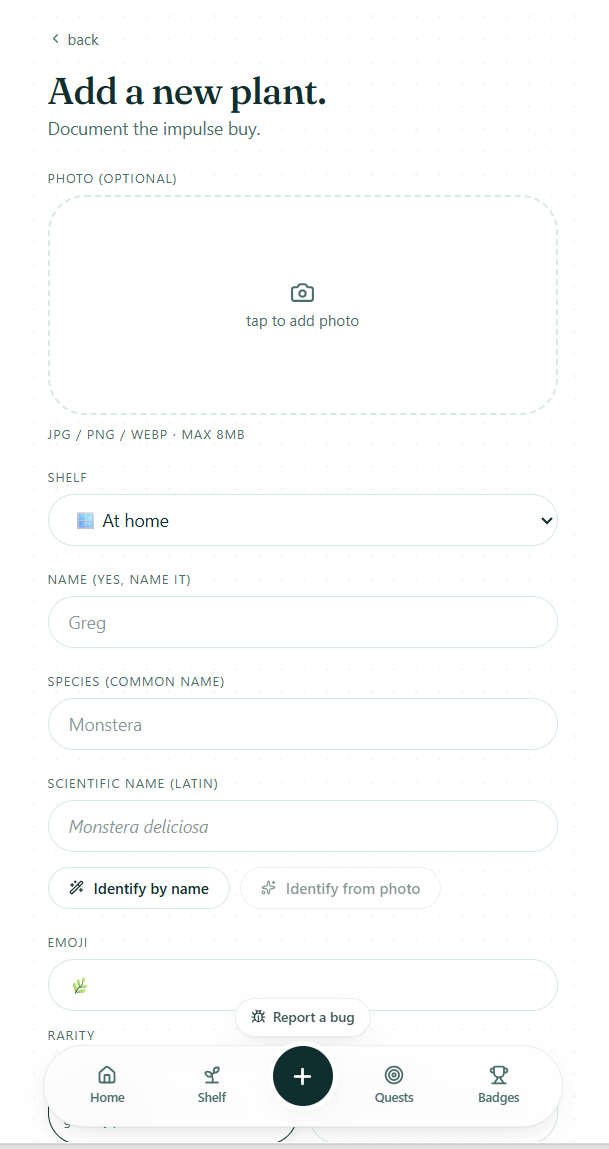
You'll see a handful of fields. None of them are required except the ones you care about — you can add a plant with nothing but a name and come back to fill in the rest later.
Photo (optional). Tap to upload one. Worth doing even if you're in a hurry, because a photo unlocks the good identification (more on that in a second) and gives you a "before" shot for later, when the thing has tripled in size and you want proof.
Shelf. This is how you group plants — by room, by windowsill, by "the ones that are thriving" and "the ones on thin ice." If you don't have any shelves yet, you can make one here. If you don't care yet, skip it and sort later.
Name (yes, name it). Greg. Susan. Lil John. This is the name you call it, not the species. It matters more than you'd think — a plant with a name gets noticed when it starts looking sad.
Species and scientific name. The common name (Monstera) and the Latin one (Monstera deliciosa). If you already know them, type them in. If you don't — that's what the next part is for.
Identifying a plant you can't name
Under the name fields there are two buttons.
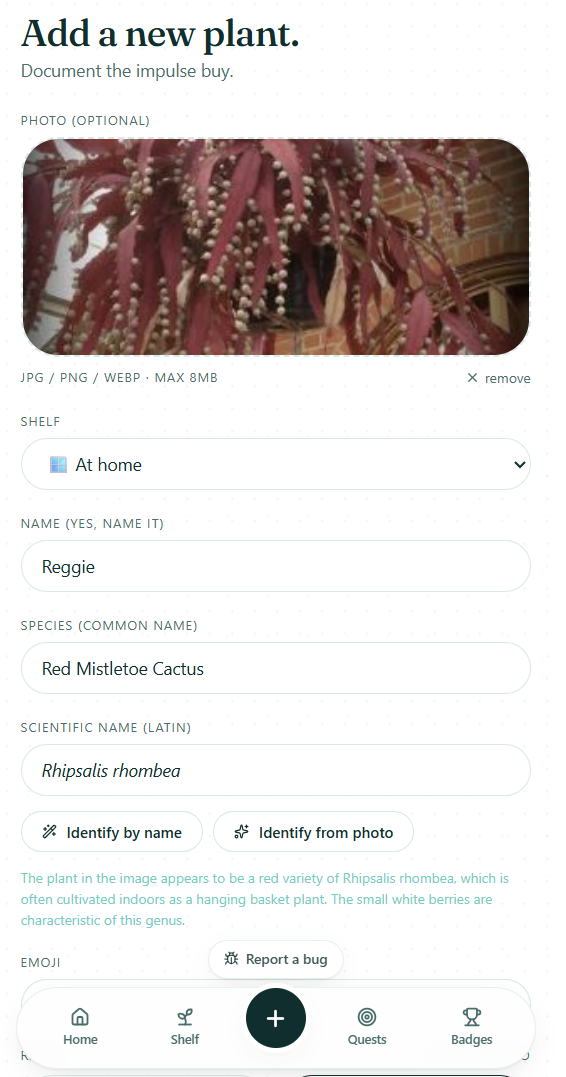
Identify by name works if you have a rough idea. Type "monstera" or even "that split leaf one" into the species field and tap it — Planthead figures out the proper species and fills in the Latin name for you.
Identify from photo is the one you want for a genuine mystery. Upload a photo first (the button stays greyed out until you do), then tap it. Planthead reads the leaf shape, veining, and growth habit and fills in the species and scientific name automatically.
Either way, you can edit whatever comes back. It's a starting point, not a verdict.
A note on limits. On the free plan you get 10 identifications per day, and they cover common indoor houseplants — the kind of thing that lives in a pot on a windowsill. If you point it at a garden shrub, a tree, a wildflower, or the herb situation on your balcony, free Planthead will politely decline. Premium removes the daily cap and opens it up to everything green: outdoor plants, trees, wildflowers, succulents, vegetables, the lot.
The rest of the form
Emoji. Planthead suggests one based on the species. Override it if you disagree. This shows up next to the plant everywhere, so pick something you'll recognize at a glance.
Rarity. How hard was this thing to get hold of. Mostly for your own satisfaction, partly so your collection has some texture to it.
Notes. Free text. Where it came from, what it's doing, what you're worried about. "Judging me from across the room" is a valid entry.
Hit save and you're done. The plant lands in your collection, and — nice touch — it also posts to your feed automatically, so anyone following you sees the new arrival and can comment on it.
Setting up watering reminders
Open any plant from your Shelf and you'll find Remind me to water and Remind me to fertilize.
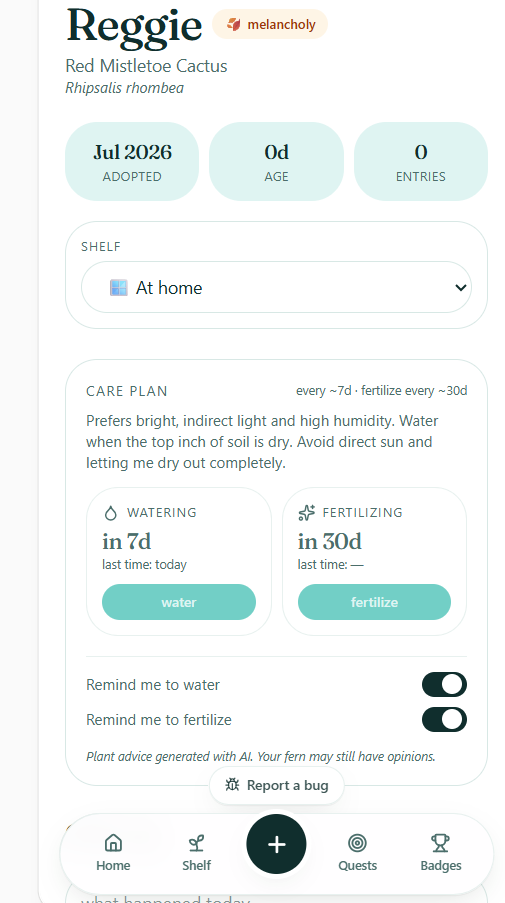
Set the interval that suits the plant and Planthead handles the rest. You'll get a nudge when it's due rather than discovering the problem three weeks later when the leaves have gone crispy.
The first time you add a plant, Planthead will ask whether you want notifications turned on. Say yes — the whole reminder system depends on it. If you said no in a moment of weakness, you can turn it back on in notification settings.
Keeping a record
Each plant has its own page, and it's more than a name and a photo.
Care plan. Planthead generates guidance for the specific species — light, water, the usual failure modes — so you're not guessing based on a generic "bright indirect light" that every article on the internet says about every plant.
Growth photos. Add a new photo whenever the plant does something interesting. Over months this turns into a proper timeline, and it is genuinely satisfying to scroll back and see what a stick it used to be.
Your notes. Ongoing observations. Repotted it, moved it, it dropped three leaves after you moved it, you moved it back.
Organizing as the collection grows
Shelves are the main tool. Group by room, by light level, by care routine — whatever matches how you actually think about them. Free accounts get a limited number; Premium removes the cap.
PlantDex tracks the species you've collected — a running record of what you've kept, which becomes weirdly compelling once you notice gaps in it.
Wishlist is for the ones you don't own yet. Useful for keeping track of what you're hunting, and for pointing at when someone asks what you want for your birthday.
Graveyard is for the ones that didn't make it. This isn't morbid — it's honest record-keeping, and there's a lot to learn from it. If one comes back from the brink, you can resurrect it back into the collection.
The social side
The Home feed shows what the people you follow are up to — new plants, milestones, actual posts.
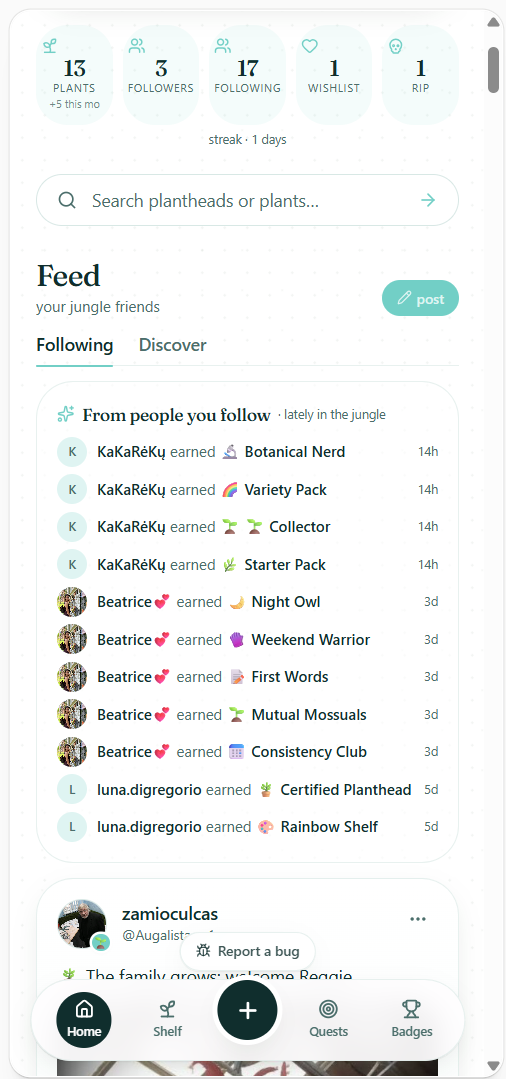
There are two tabs: Following (people you've chosen) and Discover (the wider community). Adding a plant posts automatically, but you can also write a proper post — ask why something's turning yellow, show off new growth, or just complain about spider mites to people who will genuinely sympathize.
Tagged plants in any post are tappable. See something interesting in someone's post, tap through, read about the plant.
Quests and Badges are exactly what they sound like: small goals and things you unlock for hitting them. Ignore them entirely if that's not your thing, or chase them if it is.
A reasonable first hour
If you want a concrete starting point:
-
Add your three favourite plants — photo, name, and use identify-from-photo for the species.
-
Make one or two shelves and sort them in.
-
Turn on watering reminders for whichever one you're most likely to neglect.
-
Follow a couple of people from Discover so your feed isn't empty.
That's enough to make the app useful. Everything else — the graveyard, the wishlist, the growth timelines, the badge collection — fills in naturally as you go.
Now go find out what that thing on your windowsill actually is.
Keep reading 🌿
Grow with Planthead 🌱
Track watering, log growth, earn badges. The app for accidental jungle owners.
Open the app